How to Install and Use a Car Dash Cam: My Complete Guide
Driving has always been a part of my daily routine, and over time, I began realizing the importance of having a car dash cam. It's not just a gadget; it's a reliable companion when you're on the road. In this article, I’ll share my personal journey of installing a dash cam, how I use it, and some of the tips I’ve learned along the way. Whether you’re a new car owner or an experienced driver, a dash cam is an invaluable tool that can provide peace of mind.
1. Why I Decided to Install a Dash Cam
For years, I’d heard about dash cams from friends and online forums, but I didn’t understand their value until I had a close call with a reckless driver. In that moment, I realized how crucial it was to have a record of events on the road. I could’ve used a dash cam to prove my innocence if the situation had escalated. That’s when I decided to invest in a good quality dash cam. It’s not just about protecting myself, but also about having the ability to capture incidents that might be important for insurance claims or legal matters.
2. Choosing the Right Dash Cam for My Car
Before I bought my dash cam, I spent a considerable amount of time researching the different types available. There are many options out there, each with its unique features. I’ll break down the factors that helped me make an informed decision:
2.1 Video Quality
The video quality is one of the most important aspects of a dash cam. I went for a model with at least 1080p resolution. The better the quality, the more useful the footage will be, especially in low light conditions. You don’t want to miss crucial details like license plates or road signs because the camera's resolution was too low.
2.2 Size and Discreetness
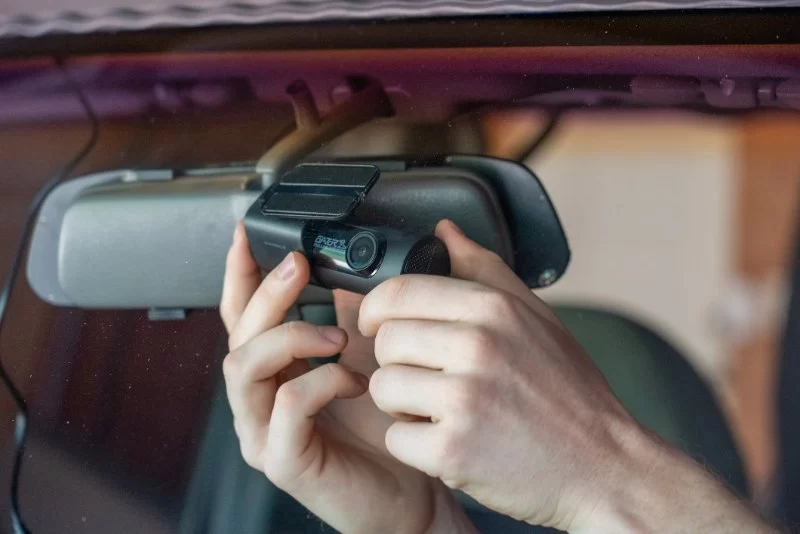
I wanted a dash cam that wouldn’t obstruct my view while driving, so I chose a small, discreet model. It’s placed behind my rearview mirror, almost unnoticeable to anyone looking in from the outside. This way, it’s always recording without drawing unnecessary attention.
2.3 Storage Capacity
Dash cams continuously loop and overwrite old footage, so I needed enough storage space to store several days' worth of footage. A dash cam with a microSD card slot is ideal. I chose one with 32GB of storage, which has worked perfectly fine for me. Depending on how often I drive, I check the footage every couple of days.
2.4 Parking Mode
Some dash cams offer a parking mode feature, which automatically starts recording when motion is detected while the car is parked. This feature is great for those times when you’re away from your car and want to make sure it’s protected. It’s especially useful if you park in public or high-risk areas.
3. The Installation Process: What I Learned
Installing a dash cam was surprisingly easy. I’ll walk you through the steps I took to make sure it was done correctly:
3.1 Prepare Your Tools and Accessories
Before starting, I made sure I had all the necessary tools and accessories, including the dash cam, a suction cup mount, power cable, and any included accessories. It’s also a good idea to have some microfiber cloths to clean the windshield and avoid any residue from obstructing the camera’s view.
3.2 Mounting the Dash Cam
The dash cam came with a suction mount, which I used to attach the camera to the windshield. I chose to mount it just behind the rearview mirror for a clear view of the road ahead without obstructing my line of sight. This position is generally recommended by experts because it ensures a wide field of view and keeps the camera discreet.
3.3 Wiring the Power Cable
Next, I had to connect the power cable to the dash cam. I ran the cable along the edge of the windshield and tucked it into the headliner and the door trim. This gave the installation a clean, professional look and prevented any wires from hanging down or getting in the way.
It’s important to ensure that the cable doesn’t interfere with airbags or other safety features. I also made sure to plug the power cable into the car’s cigarette lighter or USB port, depending on the model I had chosen.
3.4 Testing the Dash Cam
Once everything was connected, I powered on the dash cam to test if it was working properly. I made sure the camera was recording, the footage was clear, and the field of view was perfect. I also checked that the parking mode feature activated properly when I turned off the car.
4. Tips for Using My Dash Cam
Now that my dash cam was installed and ready to go, I started using it on a daily basis. Here are some tips I’ve learned along the way:
4.1 Regularly Check Your Storage
One thing I learned quickly is the importance of checking your camera’s storage regularly. Dash cams overwrite old footage once the storage is full, but I’ve found it’s still good to back up important videos. I’ve saved footage of incidents that I thought might be useful later, and I often transfer them to my computer for safekeeping.
4.2 Maintain the Lens
The camera lens can easily collect dirt, dust, or moisture, which affects the quality of the footage. I clean the lens regularly with a microfiber cloth, especially after long trips or when driving in rainy conditions. Keeping the lens clean ensures that the footage remains clear and sharp.
4.3 Use Video Evidence Responsibly
Dash cams can capture everything happening on the road, and that means the footage can be used for legal or insurance purposes. But it's important to use the footage responsibly. I’ve found myself in situations where a small incident could have escalated, but having video evidence allowed me to resolve it quickly and avoid unnecessary complications.
4.4 When to Seek Professional Help
Despite the numerous benefits of having a dash cam, there are times when the situation might require professional assistance. If you’re ever involved in an accident or find that your dash cam has malfunctioned, it’s important to seek help from experts. You can contact services like Rescue & Towing for assistance with towing or for advice on handling legal situations that arise from an accident.
5. Final Thoughts
Using a dash cam has made my driving experience safer and more secure. Whether it’s for peace of mind, legal protection, or just capturing interesting road moments, a dash cam is a great investment for any driver. If you’re interested in learning more or purchasing your own dash cam, visit Rescue & Towing for professional guidance and products that suit your needs.
Having a dash cam isn’t just about recording accidents, it’s about protecting yourself and your loved ones, and having reliable evidence when you need it most. It’s one small tool that makes a big difference in ensuring you’re always prepared on the road.