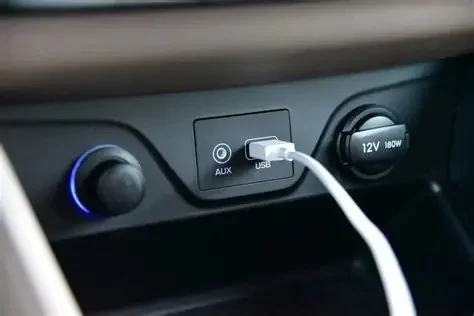
1. Understanding Why Your Car’s USB Charging Port Gets Loose
1.1 Common causes of a loose USB port
A loose USB charging port in your car can be a frustrating issue, especially when you rely on it to keep your phone charged during long drives. Over time, the constant plugging and unplugging of cables can wear down the internal metal clips that secure the connection. Dust, corrosion, or poor-quality charging cables can also accelerate the problem. In some vehicles, the port’s housing becomes unstable because of vibrations from driving, particularly on rough roads or in older cars where dashboard fixtures are not as tight as they used to be.

House of Imports
6862 Auto Center Dr, Buena Park, CA 90621, USA
1.2 How to identify a damaged or unstable port
When your USB port starts to feel loose, it’s important to determine whether the issue lies in the port itself or the cable. If multiple cables feel wobbly, the problem likely comes from the socket. Try gently moving the cable while charging—if the connection cuts in and out or you notice excessive play, your port may need repair or replacement. Many car owners also notice that their devices charge slowly or intermittently, signaling a weak connection.

Pick Your Part - Help Yourself
1232 Blinn Ave, Wilmington, CA 90744, USA
2. Temporary Fixes You Can Try Before a Repair
2.1 Cleaning the port safely
Before assuming the port is broken, clean it carefully. Use a flashlight to inspect the port and a small can of compressed air to blow away dust and debris. Avoid using metal tools that could damage the internal pins. Sometimes, what seems like a mechanical looseness is simply dirt buildup preventing the plug from fitting snugly. A quick cleaning might restore proper contact and save you from unnecessary repair costs.
2.2 Adjusting contact tension
If cleaning doesn’t help, you can slightly adjust the metal clips inside the port using a wooden toothpick or plastic pick. Apply gentle pressure to tighten them. This DIY trick works in minor cases where the contact points have relaxed over time. However, be careful—pressing too hard could bend or break the contacts entirely. If your car’s port is embedded in the dashboard or center console, it’s best not to attempt this without the proper tools.
3. When to Seek Professional Help
3.1 Signs your port needs replacement
If your port moves visibly when touched or fails to hold any cable firmly, professional servicing is likely required. Many modern vehicles integrate the USB port into the infotainment system or a power distribution panel, making home repairs risky. Attempting to fix internal wiring without experience could lead to short circuits or further electrical damage. Professional auto technicians can replace the port module or re-solder the connection safely and efficiently.
3.2 What to expect during a repair service
During a repair, technicians first inspect the wiring harness and the port mount to ensure the issue isn’t caused by a loose connector behind the dashboard. In most cases, the port itself will be replaced rather than repaired, especially if it’s part of a compact assembly. Service costs vary depending on your vehicle model, but many shops can complete the job within an hour. To ensure long-lasting results, ask the shop to check for other signs of electrical wear while they’re at it. For fast and reliable help, you can reach out to Rescue & Towing, which offers trusted assistance for electrical and roadside issues.
4. Preventing Future USB Port Problems
4.1 Handle your cables with care
Most car USB ports fail because of rough handling or low-quality cables. Always insert and remove your charging cables gently, holding the plug rather than yanking the cord. Choose certified cables that fit snugly without forcing them in. Avoid charging multiple devices simultaneously through split adapters, as this can strain the connection and create heat buildup that weakens the port’s grip.
4.2 Protect your port from wear and vibration
If you frequently drive on rough terrain, vibrations can loosen the port over time. Consider using a short extension cable that stays plugged into the port permanently—this way, you’ll plug and unplug your devices from the extension, not the car’s original port. It’s a simple trick that can greatly extend the lifespan of the built-in connector. Some drivers also use rubber grommets or dashboard pads to minimize vibration and protect sensitive components.
5. Real Stories from Drivers Who Fixed Their Loose USB Ports
5.1 A commuter’s quick DIY save
One driver from Arizona shared that after months of frustration with a shaky charging port, he discovered that compressed air and a new cable solved his issue. “I was ready to replace the whole unit,” he said, “but it turned out dust had been the problem all along.” His story shows how simple maintenance can often restore function without professional intervention.
5.2 When replacement was the best option
Another driver in Chicago found her port completely detached from the console after years of daily use. A quick visit to a local repair shop resolved the issue within 45 minutes, and the new port even supported faster charging. She mentioned, “It’s worth investing in a quality fix instead of struggling with unreliable charging.” Her experience highlights how professional help from trusted services like Rescue & Towing can prevent further damage and ensure reliable performance.
6. Final Tips for Car Owners
6.1 Maintain your vehicle’s electrical system
Regularly checking your vehicle’s electrical connections, including USB ports, can prevent small issues from becoming costly repairs. During scheduled maintenance, ask your mechanic to inspect the dashboard connections for any looseness or corrosion. Consistent care will keep your infotainment system and charging ports functioning like new.
6.2 When in doubt, call for professional support
If your USB port feels loose and you’re unsure how to fix it, professional help is the safest route. Certified auto repair shops have specialized diagnostic tools to assess wiring and ensure safe replacements. Companies like Rescue & Towing also provide emergency roadside and repair services, helping you stay connected and on the move—no matter where the road takes you.